Spry Browser
One window. Many identities. — Available now
Download
Spry Browser 154.0.8037.51 is out for Mac and Windows, built from the same code on the day. The two differ in what they can promise, so each is spelled out below. There is no Linux build yet.
Mac
Download the disk image, open it, and copy Spry Browser into your Applications folder. On a Mac this is the only download you will need: from here on Spry checks daily and offers each update in place, and installs one only after proving it came from us.
- Requires a Mac with Apple silicon (M1 or later) and macOS 13 Ventura or later. There is no Intel build.
- Signed and notarized by Apple, so it opens like any other app, with no warning to click past.
- Size 117 MB. SHA-256:
7f0c73a63938bb0a3d82ffddbde57edd7e6a039286660f251651a571e38dfe79
Windows
Download the installer and run it. Run a later one over it to upgrade.
- Requires Windows 10 or later on a 64-bit Intel or AMD machine. There is no ARM build.
- Windows will warn you, because this build carries no certificate: you will see "Windows protected your PC", with the publisher unknown. Choose More info, then Run anyway. We would rather say that plainly than have you meet the blue dialog cold. Check the figure below against your download if you want to be sure of what you have.
- No automatic updates yet. Sparkle, which keeps the Mac copy current, is Mac only. On Windows, come back here for the next version.
- Size 130 MB. SHA-256:
a0de7c353bbfa08d8ae0d8f6437d9263182386582497743c58056b5ae7bebd61
New in this release
- Streaming plays. Netflix and other sites that protect their video now work, at the same 720p any desktop browser gets on a Mac.
- Pinned tabs say when they have news. A pinned tab whose page raises a notification gets a dot, so the mail or chat you keep pinned tells you about it even when its title never changes.
- Extensions stay in their lane. An extension can no longer pull a tab out of the Space it belongs to.
Spaces and identities
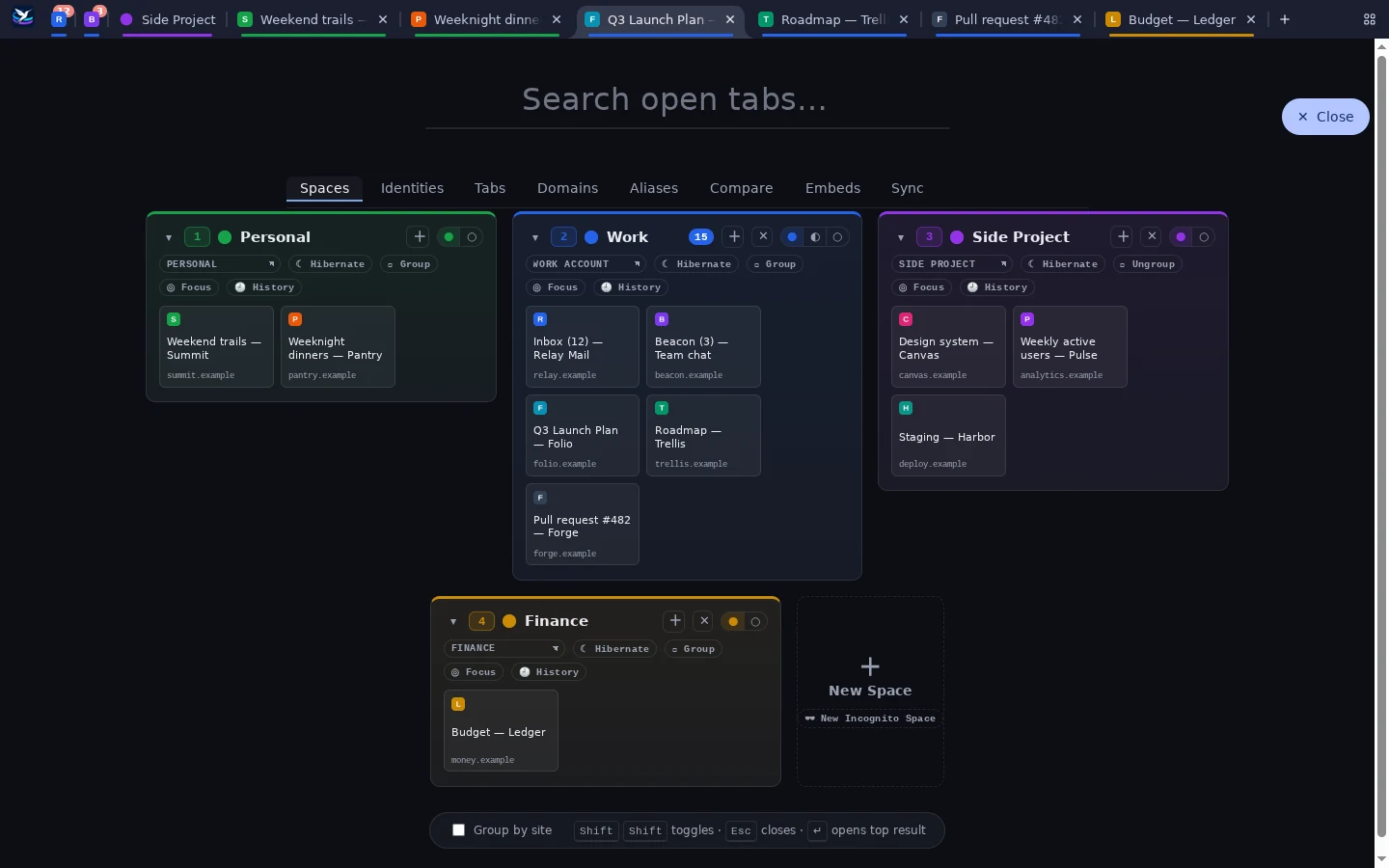
Each Space runs on its own identity, with its own cookies and logins, so you can be signed into the same site as different people side by side. Work, personal, and client accounts stop colliding without juggling profiles or windows.
Sites can belong to a Space. Open one somewhere else, and Spry offers to move it where it belongs. Links clicked in other apps ask which Space should open them.
Staying on top of a lot of tabs
- The overview opens with a double tap of Shift. Rename, recolor, group, hibernate, and reorder Spaces, manage identities, and search every open tab.
- Keyboard first: Ctrl+1 through 9 shows or hides a Space, and Ctrl+Shift+E starts a new one.
- Focus mode hides everything except the Space you're working in.
- Groups collapse a Space to a single tab, with its own tabs in a second row.
- Hibernation frees a Space's memory but keeps its tabs, which reload when you return.
- Unread counts from page titles, and a dot for background changes, show what needs attention.
- Incognito Spaces keep nothing: no history, no restore, and no sync.
- Sane tab order: new tabs open next to their Space's tabs, and closing one returns you to the tab you came from.
A thin layer over Chromium
Spry never maintains its own fork of Chromium. Its changes are a small, layered set applied by script to a pristine Chromium release, so it can follow new releases closely instead of falling behind on security fixes. Extensions and sites work the way they do in any Chromium browser.